
IT asset register template (Excel) for accountancy practices
Keep one list of every laptop, phone and router the firm uses and every account on every system, and see straight away which ones need action. This IT asset register template is one Excel workbook with room for 150 devices and 300 accounts, each checked against the Cyber Essentials rules.
UK practicesGet this pack and 100 more for $129
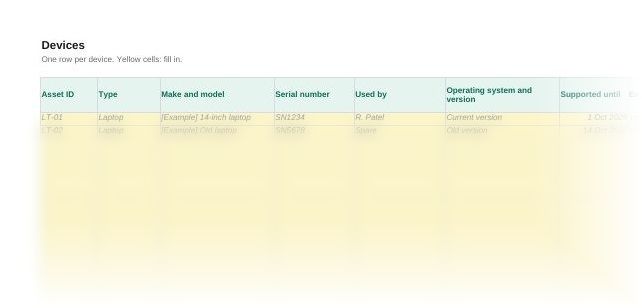
What the register looks like
When you need it
An IT asset register is the firm's list of every device and every account, and what each one needs. Cyber Essentials covers every device and cloud service that holds or reaches the firm's data, so the register shows what is in scope and what is not yet compliant. A small practice needs one when:
- You are preparing for Cyber Essentials and need to know what is in scope
- Staff use their own phones or laptops for firm email or client files
- Someone has left and nobody is sure every account was closed
- Nobody can say which laptops are encrypted or still get security fixes
How to use the IT asset register template
- Set your review periods. On Settings, choose how often accounts are reviewed (every 3 months as set) and after how many days without a patch a device is flagged (14 as set).
- List every device. One row on Devices for each laptop, desktop, tablet, phone, server and router, including personal devices used for firm work. Delete the example rows first.
- List every account. One row on Accounts for each person on each system, including every cloud service, with who approved it and when.
- Work through the Check column. Each row shows OK in green or the action to take in red, such as Turn on encryption or Disable this account or remove access.
- Review it every quarter. The Summary counts devices and accounts needing action, unsupported devices, cloud accounts without multi-factor authentication and leavers still with access.
Questions
What is an IT asset register?
A list of the hardware and accounts a business uses, with who has each one and its security status. This one keeps devices and accounts on separate sheets, because a leaver's laptop and a leaver's logins need different checks.
What should be in an IT asset register?
For each device: an asset ID, type, make and model, serial number, user, operating system, support end date, encryption, patching, malware protection and status. For each account: the system, the person, administrator rights, multi-factor authentication, who approved it, the last review and the date it was removed.
Does Cyber Essentials require an asset register?
Asset management is not one of the five Cyber Essentials controls, but the NCSC says good asset management helps meet all five. The requirements cover every device and cloud service that accesses the organisation's data, so you need to know what you have before you can show it meets them.
Should personal devices go in the register?
Yes, if they are used for firm work. Under Cyber Essentials, staff-owned devices that access the organisation's data or services are in scope. A phone used only for calls, texts and an authenticator app is out of scope.
How quickly must security patches be installed?
Within 14 days of release for patches that fix critical or high-risk vulnerabilities, or where the vendor gives no details of what they fix. Turn on automatic patching where you can, and remove software once it is no longer supported.
How often should user accounts be reviewed?
The register sets a review every 3 months, which you can change. Cyber Essentials requires accounts to be removed or disabled when they are no longer needed, for example when someone leaves, and extra access removed when someone changes role.
Also in the practice IT security pack
Who it's for
Small UK accountancy and bookkeeping practices, with or without Cyber Essentials certification.
Last checked
Checked against the Cyber Essentials Requirements for IT Infrastructure v3.3 (April 2026) in November 2026.